My Learnings
My Learnings
The 'My Learnings' section provides users with easy access to their assigned courses and training programs in a user-friendly way.
To Access the assigned Course:
1. On the home page, assigned courses are displayed under the “Courses” tab.
2. Use the “Filter” option to view different course categories.
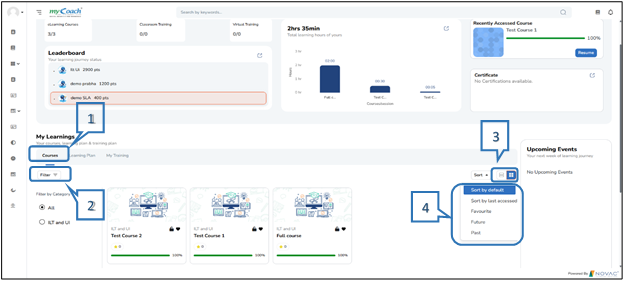
3. Courses are initially shown in a card view; however, there will be an option to switch to a list view for easier navigation.
4. Sort Options:
· Sort by Default: Displays the standard course screen on the myCoach.
· Sort by Last accessed: Displays the courses recently accessed by the learner.
· Favourite: Displays the courses that the learner has added to their favourites.
· Future: Displays the courses scheduled to begin on future dates.
· Past: Displays the courses that have concluded.