Dashboard Widget
Dashboard Widgets
The dashboard widgets provide a clear, concise overview of learning progress. Upon logging in, learners are presented with a progress summary that includes several widgets: Enrolled Courses (E-learning, Classroom, and Virtual), Recently Accessed, Certificates, Leaderboard, and Learning Hours. Overall, these widgets enhance the learning experience by offering valuable insights at a glance.
Instruction
Once the learner logs into myCoach, the dashboard is displayed, featuring the following widgets:
1. E‑Learning Courses: Displays the number of assigned e-learning courses. Selecting this widget opens the E-learning Summary Report.
2. Classroom Training: Shows the count of assigned in-person training sessions. Clicking on this widget opens the Classroom Training Summary Report.
3. Virtual Training: Displays the number of assigned virtual training sessions. Selecting this widget opens the Virtual Training Summary Report.
4. Bar Chart Learning Hours: Shows the learning hours for recently completed courses.
5. Total Learning Hours: Displays the cumulative learning hours.
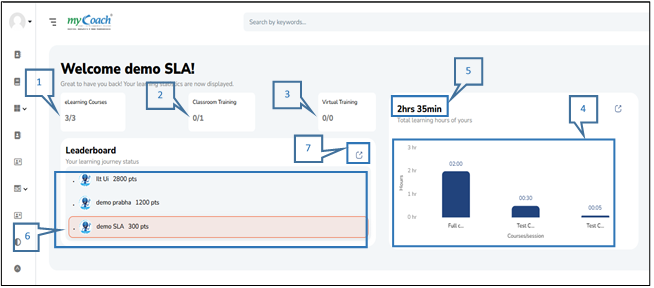
6. Leaderboard: The leader board shows the top 2 users, highlights the logged-in user with their points.
7. Explore (Leaderboard): Clicking on a quick link displays their detailed information.
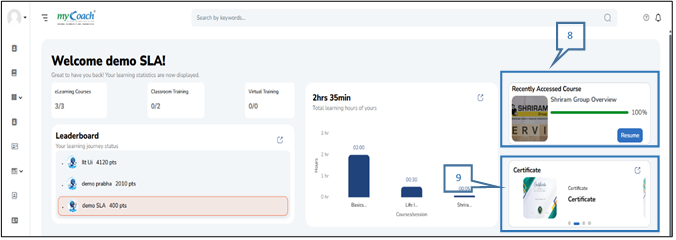
8. Recently Accessed Course: allows learners to resume from where they left off without restarting from the beginning.
9. Certifications: Displays available and issued certificates in an auto-scrolling view.